[note] langfuse
參考資料
- Bonus Unit 2: Observability and Evaluation of Agents @ Hugging Face & notebook
- Evaluating OpenAI Agents @ langfuse
Langfuse & OTEL
OTEL and Langfuse @ Python SDK v3
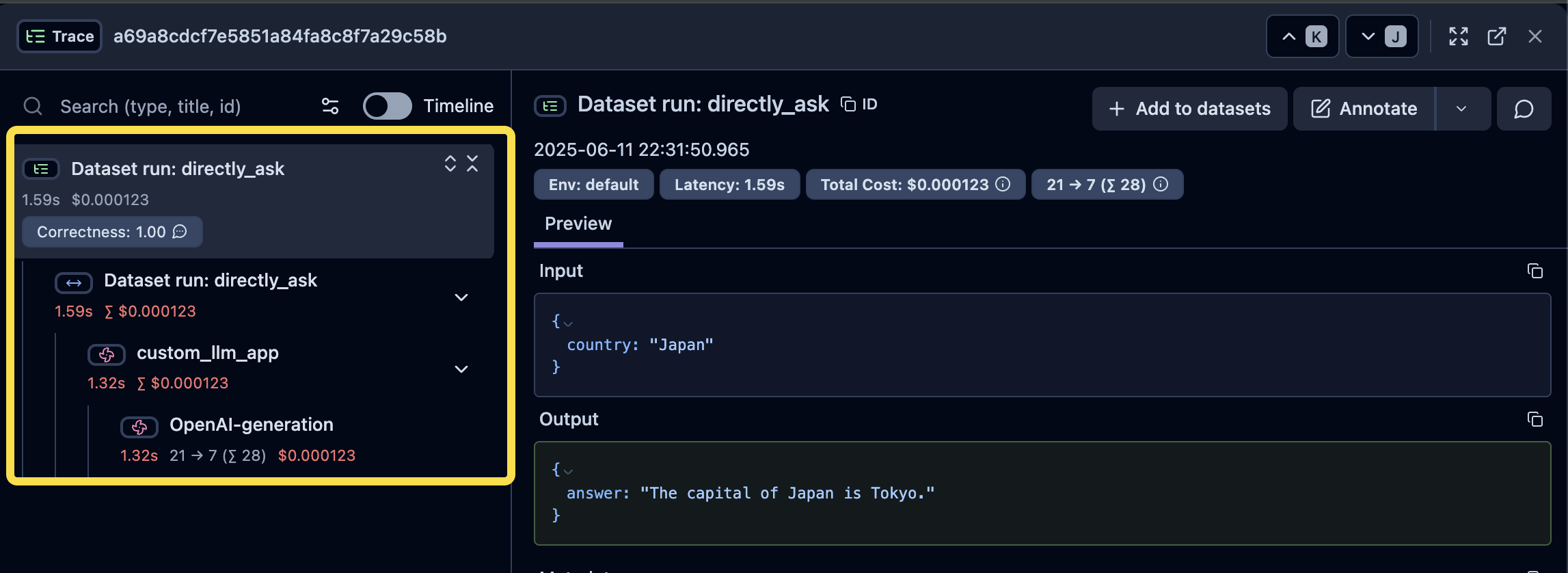
從下面這張圖可以很清楚看到 Langfuse 和 OpenTelemetry 中用來記錄的關係:
- Trace:最上層是 Trace,有它自己的 Input/Output
- Observation(Span/Generation):Trace 由多個 Span 組成,在 Langfuse 中又有特化給 LLM 使用的 Span,稱作 Generation(粉紅色風車圖示),它可以帶入更多和 LLM 有關的屬性;一般的 Span 則是藍色水平箭頭圖示。
Datasets & LLM-as-a-Judge (Prompt Experiment)
在 Langfuse 中如果希望用 LLM-as-a-Judge 搭配 Datasets 中的 Create Prompt Experiment 有幾個前置步驟:
[!caution]
Prompt Experiment 的做法不會實際去執行自己寫好的 Agent,而是 Langfuse 會去把 Prompt 送到 LLM(Model) 去跑一次,以此得到結果。所以如果是真的希望能用 Agent 執行的結果來使用 LLM-as-a-Judge,還是得要使用 Custom Experiment,也就是以程式的方式,實際把 dataset 拉下來,真的用 Agent 跑完後,LLM-as-a-Judge 才會評估 Agent 跑之後的結果。
-
先設定好 LLM-as-a-Judge 的 Evaluator
- 如果是要針對已經存在的 dataset,可以參考一下設定

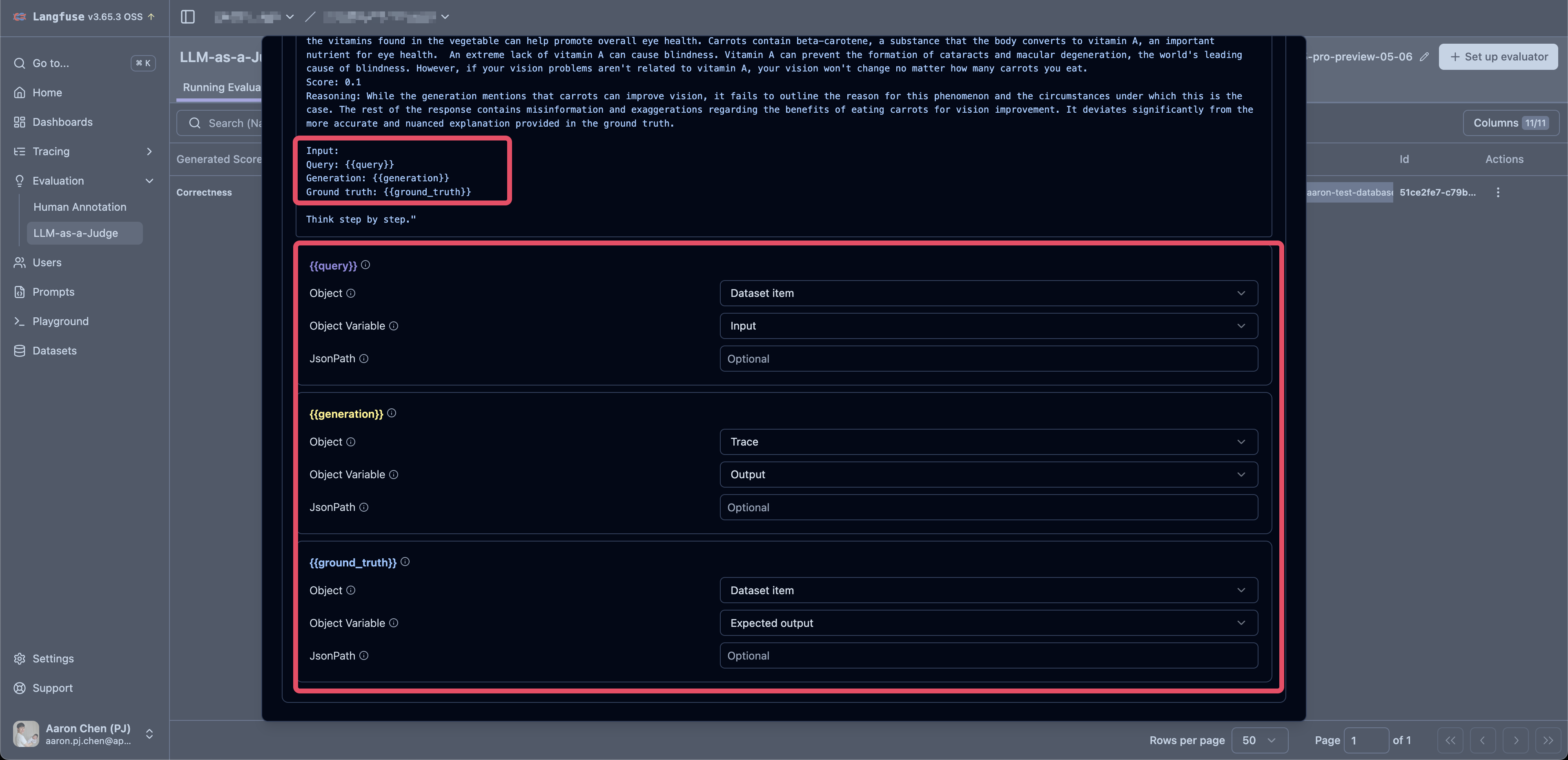
- variable 的 mapping 也要留意
{{query}}拿 dataset item 中的 "Input"{{generation}}拿 trace 中的 output(實際 LLM 執行後得到的結果){{ground_truth}}拿 dataset item 中的 "Expected output"
[!caution]
建立 Evaluator 是會需要同時建立給 Evaluator 用的 LLM Model,目前使用 OpenAI 和 Claude 都沒有太大問題,但如果用 Gemini 的 Model 則是有遇到「Failed to call LLM: TypeError: Cannot read properties of undefined (reading 'message')」的錯誤(2025.06.11)。
-
建立 Prompt
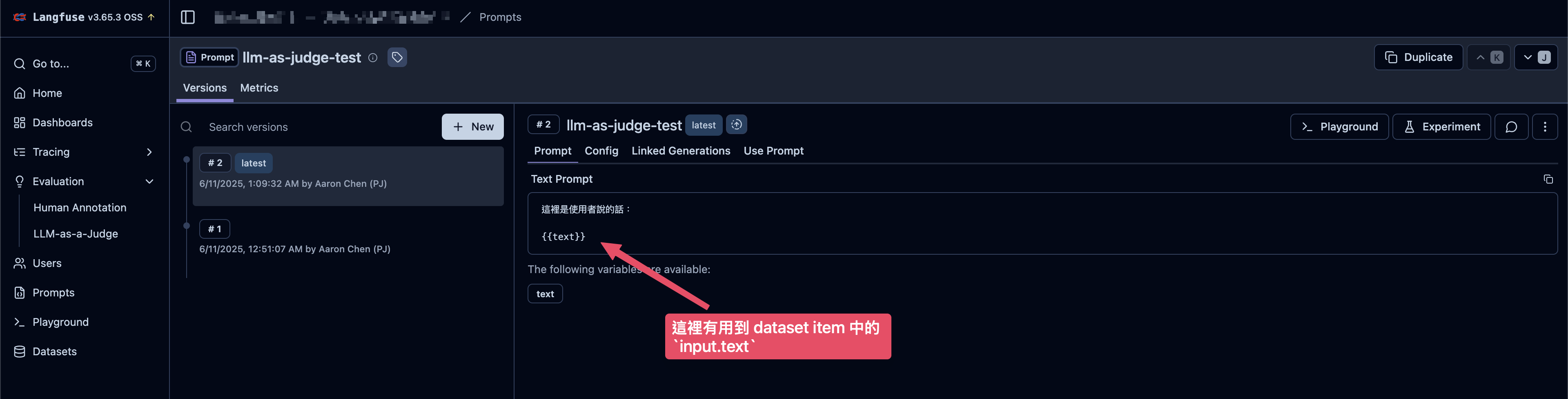
- 這個 Prompt 中需要使用到後續建立的 dataset item 中定義的
input
- 這個 Prompt 中需要使用到後續建立的 dataset item 中定義的
-
建立 dataset 和 dataset item
- 在 Datasets > Items 頁籤右上角有「New item」可以添加 item
- Dataset item 中會包含
input、output和metadata- 目前
input一定要是 JSON object
- 目前

-
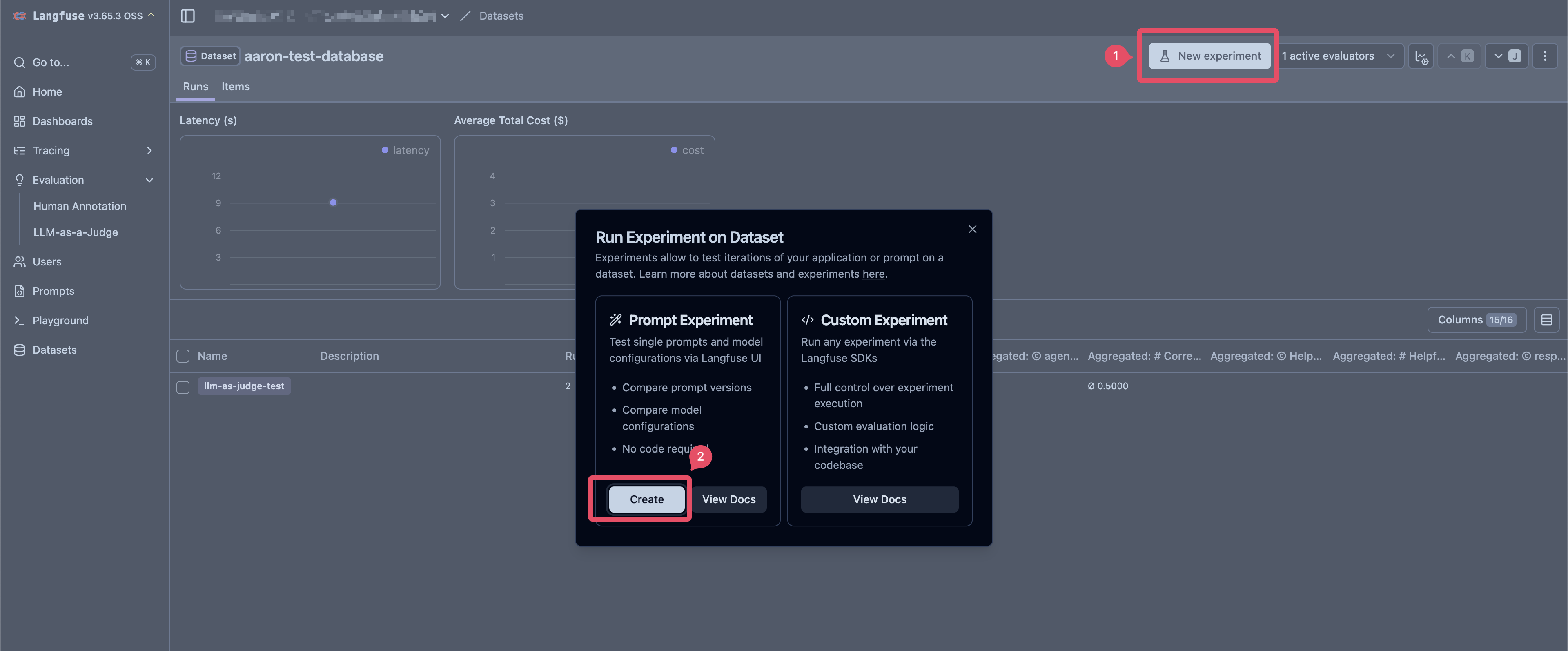
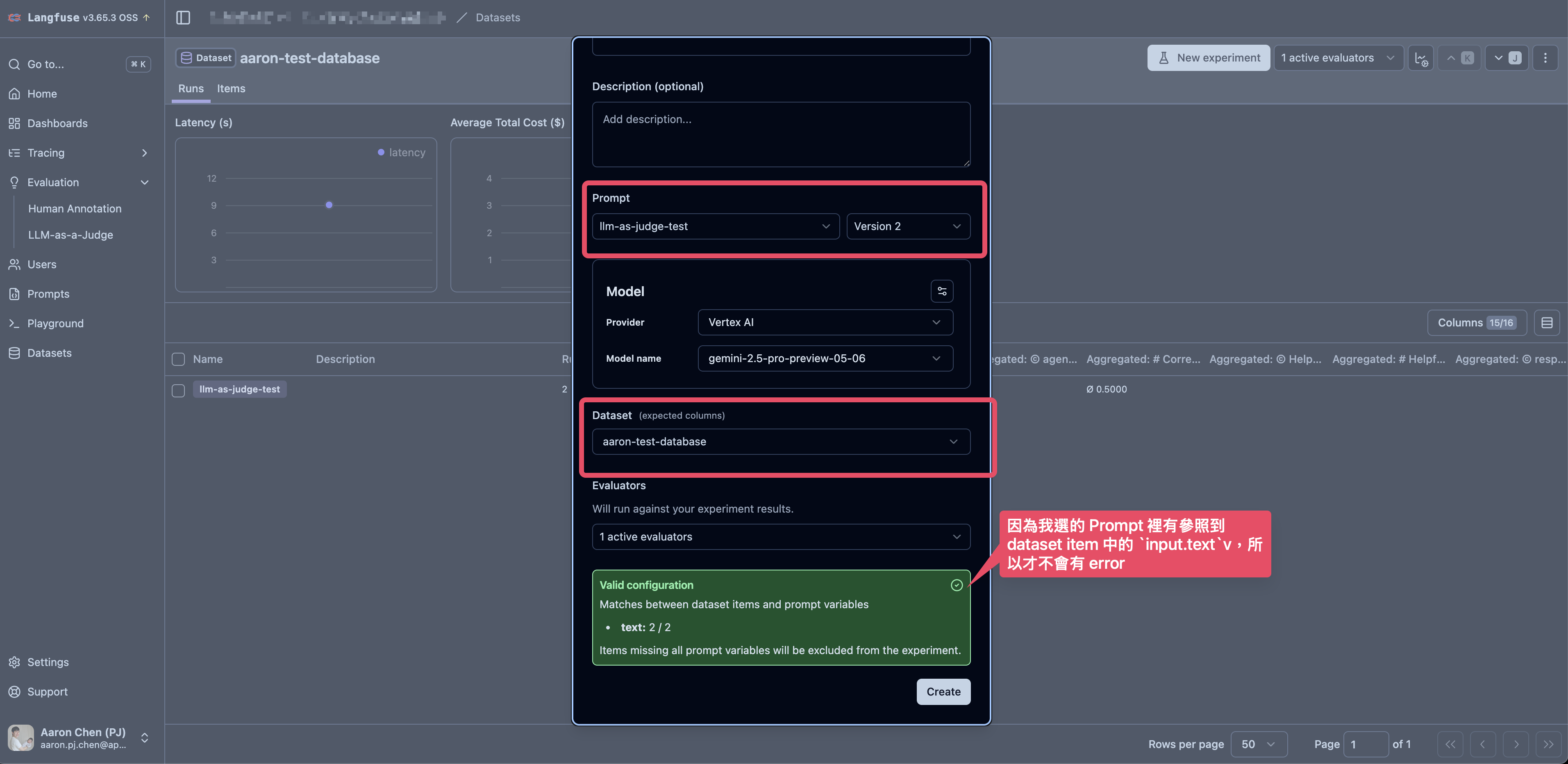
執行 Experiment
- 如果使用 Dataset 的 Create Experiment 的功能,則
inputJSON Object 的 key 一定要有一個出現 Dataset 的Prompt中,否則會出現 Cannot use prompt experiments "No dataset item contains any variables" 的錯誤
- 如果使用 Dataset 的 Create Experiment 的功能,則
Langfuse Python SDK v3 閱讀筆記
官方文件:Python SDK (v3)
%pip install langfuse openai langchain_openai langchain python-dotenv --upgrade
import os
from dotenv import load_dotenv
from langfuse import Langfuse

load_dotenv()


langfuse = Langfuse(
    public_key=os.environ.get("LANGFUSE_PUBLIC_KEY"),
    secret_key=os.environ.get("LANGFUSE_SECRET_KEY"),
    host=os.environ.get("LANGFUSE_HOST"),
    debug=False,
)
Basic Tracing
Context Manager
- 使用
langfuse.start_as_current_span()和langfuse.start_as_current_generation()都可以產生新的 span,但 "generation" 是特化的 span,因此可以接受更多和 LLM 有關的參數,例如model、usage_details、cost_details等等(參考:Update Observation、OTEL and Langfuse @ Langfuse)
from langfuse import get_client

langfuse = get_client()

# create a span
with langfuse.start_as_current_span(name="process-request") as root_span:
    query = "Tell me a joke about OpenTelemetry"
    root_span.update(input=query)

    root_span.update_trace(
        user_id="user_123", session_id="session_abc", tags=["experimental", "comedy"]
    )

    # Create a nested generation for an LLM call
    with langfuse.start_as_current_generation(
        name="llm_response",
        model="gpt-4o",
        input=[{"role": "user", "content": query}],
        model_parameters={"temperature": 0.7},
    ) as generation:
        # Simulate an LLM call
        joke_response = "Why did the OpenTelemetry collector break up with the span? Because it needed more space... for its attributes!"
        token_usage = {"input_tokens": 10, "output_tokens": 25}

        generation.update(output=joke_response, usage_details=token_usage)
        # Generation ends automatically here

    root_span.update(output={"final_joke": joke_response})

langfuse.flush()
Nesting Observations
from langfuse import get_client

langfuse = get_client()

with langfuse.start_as_current_span(name="outer-process") as outer_span:
    with langfuse.start_as_current_generation(name="llm-step-1") as gen1:
        gen1.update(output="LLM 1 output")
    with outer_span.start_as_current_span(name="intermediate-step") as mid_span:

        with mid_span.start_as_current_generation(name="llm-step-2") as gen2:
            gen2.update(output="LLM 2 output")

        mid_span.update(output="Intermediate processing done")

    outer_span.update(output="Outer process finished")
Updating Observations (Span/Generation)
- 使用
[span/generation].update()可以更新該 span 中的屬性 - 如果在 context 中沒有想要直接指定 span/generation,可以使用
langfuse.update_current_span()或langfuse.update_current_generation(),langfuse 會直接使用 context 中的 currently active observation - span/generation 可以帶入的參數 @ Langfuse
from langfuse import get_client

langfuse = get_client()

with langfuse.start_as_current_generation(name="llm-call", model="gpt-4o") as gen:
    gen.update(input={"prompt": "Why is the sky blue?"})
    # ... make LLM call ...
    response_text = "Rayleigh scattering..."
    gen.update(
        output=response_text,
        usage_details={"input_tokens": 5, "output_tokens": 50},
        metadata={"confidence": 0.9},
    )

    # 或者也可以用 langfuse.update_current_span()
    langfuse.update_current_span(metadata={"step1_complete": True})
Setting Trace Attributes
- Trace 包含多個 Span,在 Langfuse 中,可以針對 trace 添加特定屬性,例如
name、user_id、session_id、input、output、tags等等。 - Trace 的 Attribute 可以直接在 Langfuse Traces 的 dashboard 上看到
- trace 可以帶入的參數 @ Langfuse
- 使用
[span/generation].update_trace()或langfuse.update_current_trace()都可以添加屬性到 trace 上
from langfuse import get_client

langfuse = get_client()

with langfuse.start_as_current_span(name="initial-operation") as span:

    # Set trace attributes early
    span.update_trace(
        user_id="user_xyz", session_id="session_789", tags=["beta-feature", "llm-chain"]
    )

    # Later, from another span in the same trace:
    with span.start_as_current_generation(name="final_generation") as gen:
        langfuse.update_current_trace(output={"final_status": "success"})
- 在 v3 中,trace 的 input/output 預設會自動以 root observation (first span/generation) 的 input/output 來呈現
# Trace input/output 的預設行為
from langfuse import get_client

langfuse = get_client()

with langfuse.start_as_current_span(
    name="user-request",
    input={
        "query": "What is the capital of France?" # 預設 root span 的 input 就會變成 trace 的 input
    },
) as root_span:
    with langfuse.start_as_current_generation(
        name="llm-call",
        model="gpt-4o",
        input={
            "message": [{"role": "user", "content": "What is the capital of France?"}]
        },
    ) as gen:
        response = "Paris is the capital of France."
        gen.update(output=response)

    root_span.update(
        output={"answer": "Paris"} # 預設 root span 的 output 會變成 trace output
    )
# 覆蓋掉預設行為拿 root span 的 input/output 變成 trace input/output 的行為

from langfuse import get_client

langfuse = get_client()

with langfuse.start_as_current_span(name="complex-pipeline") as root_span:
    # 如果 Root span 的 input/output 不像直接被當成 Trace 的 input/output
    root_span.update(input="Step 1 data", output="Step 1 result")

    root_span.update_trace(
        input={"original_query": "User's actual question"},
        output={"final_answer": "Complete response", "confident": 0.95},
    )
Trace and Observation IDs
-
使用
langfuse.get_current_trace_id()可以得到目前 active observation(span/generation) 的 trace_id -
使用
langfuse.get_current_observation_id()可以得到目前 active observation(span/generation) 的 ID -
也可以直接使用
[span/generation].trace_id或[span/generation].id來取得 trace ID 和 Observation ID -
如果某些情況下,需要指定
trace_id可以使用trace_context這個參數
from langfuse import get_client

langfuse = get_client()

existing_trace_id = "abcdef1234567890abcdef1234567890"
existing_parent_span_id = "fedcba0987654321"

with langfuse.start_as_current_span(
    name="process-downstream-task",
    trace_context={
        "trace_id": existing_trace_id,
        "parent_span_id": existing_parent_span_id,  # 如果沒給的話,會變成 root span
    },
) as span:
    pass
Scoring traces and observation
使用 Span 或 Generation 物件
span_or_generation_obj.score()來針對某個 observation 進行評分span_or_generation_obj.score_trace()來針對整個 trace 進行評分
使用 Langfuse 物件
langfuse.score_current_span()來針對當前 active 的 observation 進行評分langfuse.score_current_trace()來針對當前 active 的 trace 進行評分
如果針對特定 trace 來評分,或者 trace/observation 已經完成無法取得,也可以使用 langfuse.create_score() 來幫特定 trace_id 建立評分
from langfuse import get_client

langfuse = get_client()

with langfuse.start_as_current_generation(name="summary_generation") as gen:
    # ... LLM call ...
    gen.update(output="llm output...")

    # Score this specific generation
    gen.score(name="conciseness", value=0.8, data_type="NUMERIC")

    # Score the overall trace
    gen.score_trace(
        name="user_feedback_tracing", value="positive", data_type="CATEGORICAL"
    )
Datasets
- 使用
langfuse.get_dataset(name: str)來取得DatasetClient的實例。使用dataset.items這可以取得DatasetItemClient實例,其中包含input、expected_output和metadata - 使用
langfuse.create_dataset(...)和langfuse.create_dataset_item(...)可以用來建立 Dataset 以及 Dataset Items
from langfuse import get_client

langfuse = get_client()

# Fetch an existing dataset
dataset = langfuse.get_dataset(name="my-eval-dataset")
for item in dataset.items:
    print(f"Input: {item.input}, Expected: {item.expected_output}")

# Briefly: Creating a dataset and an item
new_dataset = langfuse.create_dataset(name="new-summarization-tasks")
langfuse.create_dataset_item(
    dataset_name="new-summarization-tasks",
    input={"text": "..."},
    expected_output={"summary": "..."},
)
Offline Evaluation
使用 Langfuse 做 offline evaluation 的方式 @ Hugging Face Notebook
[DEPRECATED] Langfuse Python SDK v2
Tracing and Monitoring
整合 Langfuse 通常包含幾個步驟:
from opentelemetry import trace
from opentelemetry.exporter.otlp.proto.http.trace_exporter import OTLPSpanExporter
from opentelemetry.sdk.resources import Resource
from opentelemetry.sdk.trace import TracerProvider
from opentelemetry.sdk.trace.export import BatchSpanProcessor

# 1. 建立 TracerProvider(service level)
provider = TracerProvider(
    resource=Resource.create(
        {
            "service.name": "FAKE SERVICE NAME",
            "langfuse.environment": "FAKE ENV",
        }
    )
)

# 2. 設定 OTLP Receiver/Endpoint
exporter = OTLPSpanExporter(
    endpoint=f"{langfuse_config.HOST}/api/public/otel/v1/traces",
    headers={
        "authorization": langfuse_config.OTLP_HEADER,
    },
)

# 3. 添加 Processor:處理 Span export 的方式
#   一個 provider 可以有多個 span exporter 和 span processor。
provider.add_span_processor(BatchSpanProcessor(exporter))

# 4. 把 provider 設成 global
trace.set_tracer_provider(provider)

# 5. 一般 tracer name 會設定成 module name,例如 "__name__"、"app.main"
#   目的是可以知道這個 span 是由哪個 module(tracer) 所建立
tracer = trace.get_tracer("module_name")

# 6. 添加額外給 langfuse 用的屬性
with tracer.start_as_current_span("user_request") as root_span:
    root_span.set_attributes(
        {
            "langfuse.user.id": req.user_id,
            "langfuse.session.id": req.session_id,
            "langfuse.tags": ["tag-1"],
        }
    )
再發送給 Observability Backend / Telemetry Backend(例如,Langfuse)是的資料會長這樣:
{
  "resourceSpans": [{
    "resource": {
      "attributes": [
        {
          "key": "service.name",
          "value": {"stringValue": "FAKE SERVICE NAME"}  // ← "service.name" 在這裡出現
        },
        {
          "key": "langfuse.environment",
          "value": {"stringValue": "FAKE ENV"}
        }
      ]
    },
    "scopeSpans": [{
      "scope": {
        "name": "module_name",  // ← 這是 tracer 名稱,不是 service.name
        "version": ""
      },
      "spans": [
        {
          "name": "user_request",
          "attributes": {...}
        }
      ]
    }]
  }]
}
Feedback
我們也可以透過 OTEL 把使用者的回饋傳到 Langfuse 上:
# https://colab.research.google.com/#scrollTo=G_Lp1YCLM01a&fileId=https%3A//huggingface.co/agents-course/notebooks/blob/main/bonus-unit2/monitoring-and-evaluating-agents.ipynb
# 4. User Feedback
# ...
from langfuse import Langfuse

langfuse.score(
    value=0,
    name="user-feedback",
    trace_id=formatted_trace_id
)