Table of Contents
[TOC]
Reference
- Sample Codes @ Google Colab
- LangGraph Essentials @ LangGraph Academy
Components
使用 LangGraph 通常會包含幾個步驟:
- Define State
- Define Node
- (optional) define conditional edges
- Build the Graph (Define Edge)
- StateGraph
- Add nodes
- Add edges (static and conditional edges)
- Compile and Display
- Invoke the Graph
- define initial state
- invoke with initial state
State: Data
-
會被餵進去 Graph 中,被 Graph 更新,最後回傳給使用者
-
可以使用 Pydantic Model、TypedDict、dataclass 來定義 State
-
在定義 State 的時候,可以同時定義 reducer function 來處理 state
class State(TypedDict):
  # operator.add 是 Langgraph 提供的 reducer function
  # 以這裡來說,是說明 State 被呼叫時,它會把新的資料 append 到 nlist 中,而不是覆蓋
  nlist: Annotated[List[str], operator.add]

State(nlist=["A"])  # nlist=["A"]
State(nlist=["B"])  # nlist=["A", "B"]
StateGraph
- graph 是無狀態的(stateless)
- 定義一個 graph 時,需要先把 graph 會用到的 state 定義好,這個 state 可以被 graph 中的所有 node 所共享
- 當 graph 被 invoke 的時候,state 會被初始化
builder = StateGraph(State)
# ...
graph = builder.compilie()
# ...
graph.invoke()
Reducer
operator.add是 python 內建的 reducer function- 透過 Annotated Type 的 metadata 把 reducer function 帶入
class State(TypedDict):
    # operator.add 是 reducer function,用來說明當有多個 Node 對 State 進行處理的話
    # 要如何處理
    nlist: Annotated[list[str], operator.add]
Node: Functions
- 是一個 function,input 是 state,output 是更新後的 state
Edges: Control Flow
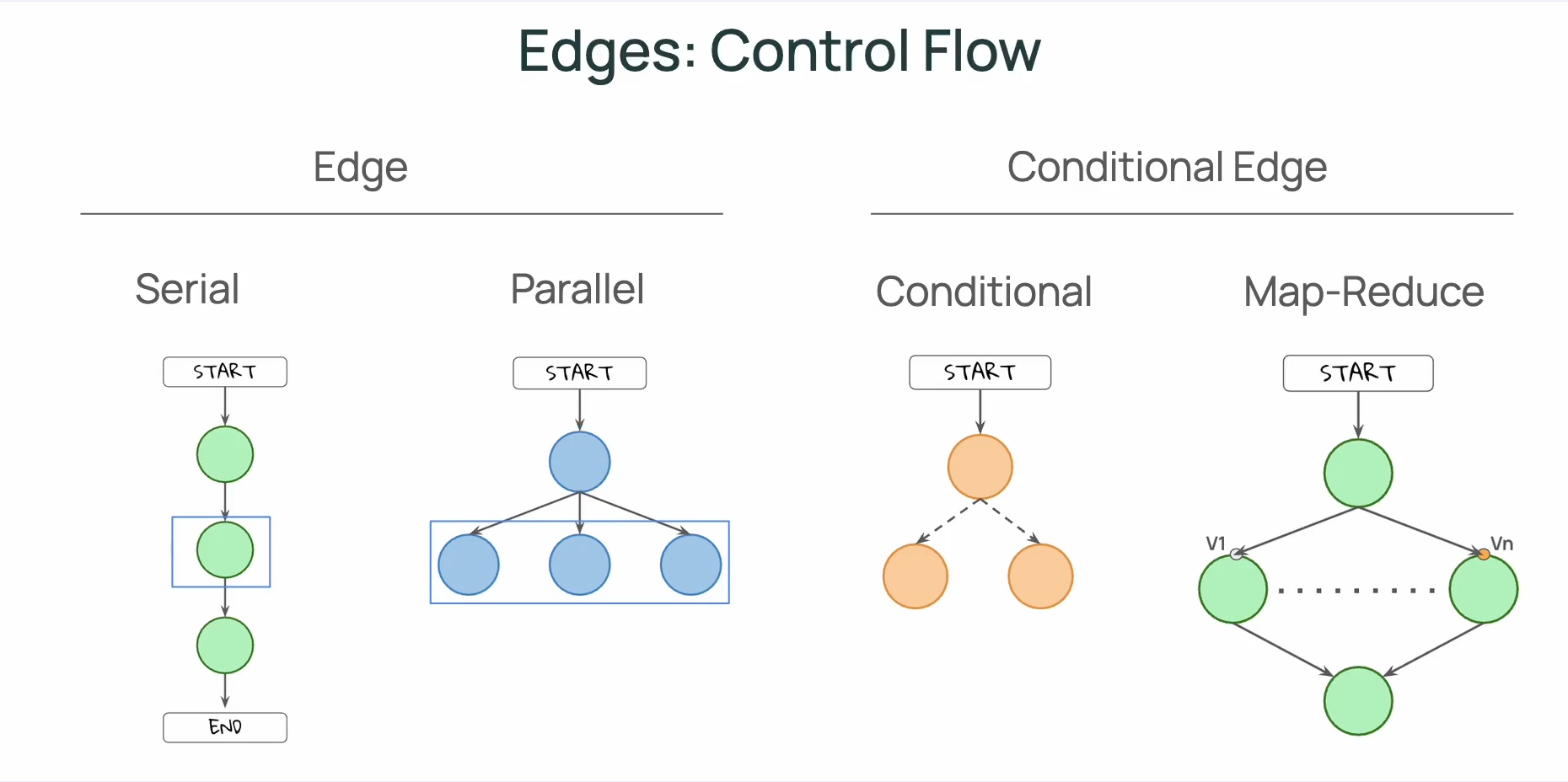
[!TIP] 一個重點是:Edge 可以控制 control flow,但不能控制 data(state)能被誰(哪個 node)存取;在 LangGraph 中 State 會被所有 Nodes 所共享。
[!TIP] 在圖中,我們會用「實線」來表現 Static Edges;用「虛線」來表示 Conditional Edges。
Static Edges
- Serial
- Parallel
Conditional Edges
- Conditional
- Map-Reduce
建立 Conditional Edges 的方式有兩個:
- 定義 conditional edge function 並使用
builder.add_conditional_edges() - 不額外定義 conditional edge,而是在 Node 中使用
Command方法
方法一:
# Define Conditional Edges
def conditional_edge(state: State) -> Literal["b", "c", END]:
  select = state["nlist"][-1]
  if select == "b":
    return "b"
  elif select == "c":
    return "c"
  elif select == "q":
    return END
  else:
    return END
# Build the graph
builder = StateGraph(State)

# Add nodes
builder.add_node("a", node_a)
builder.add_node("b", node_b)
builder.add_node("c", node_c)

# Add edges
builder.add_edge(START, "a")
builder.add_edge("b", END)
builder.add_edge("c", END)
builder.add_conditional_edges("a", conditional_edge)  # Add conditional edges

# Compile and display
graph = builder.compile()
display(Image(graph.get_graph().draw_mermaid_png()))
方法二:透過 Command 把邏輯放在 Node 中
def node_a(state: State) -> Command[Literal["b", "c", END]]:
  select = state["nlist"][-1]
  if select == "b":
    next_node = "b"
  elif select == "c":
    next_node = "c"
  elif select == "q":
    next_node = END
  else:
    next_node = END

  return Command (
      # update state
      update = State(nlist=[select]),
      # specify next node
      goto = next_node
  )

# 不需要再額外添加 conditional edges
# builder.add_conditional_edges("a", conditional_edge)  # Add conditional edges
CheckingPoint/Memory
由於在 LangGraph 中,所有的 Node 都會共享 State,如果我們希望能在每一個 step 結束後,記錄當下的資料狀態(類似 snapshot),則可以使用 checkpoint。
透過 checkpointer 你可以把每一步驟結束時的資料狀態保存下來。
thread 則是把一系列的 checkpoint 整理起來,如此可以回朔出經過每個步驟後,資料改變了些什麼。
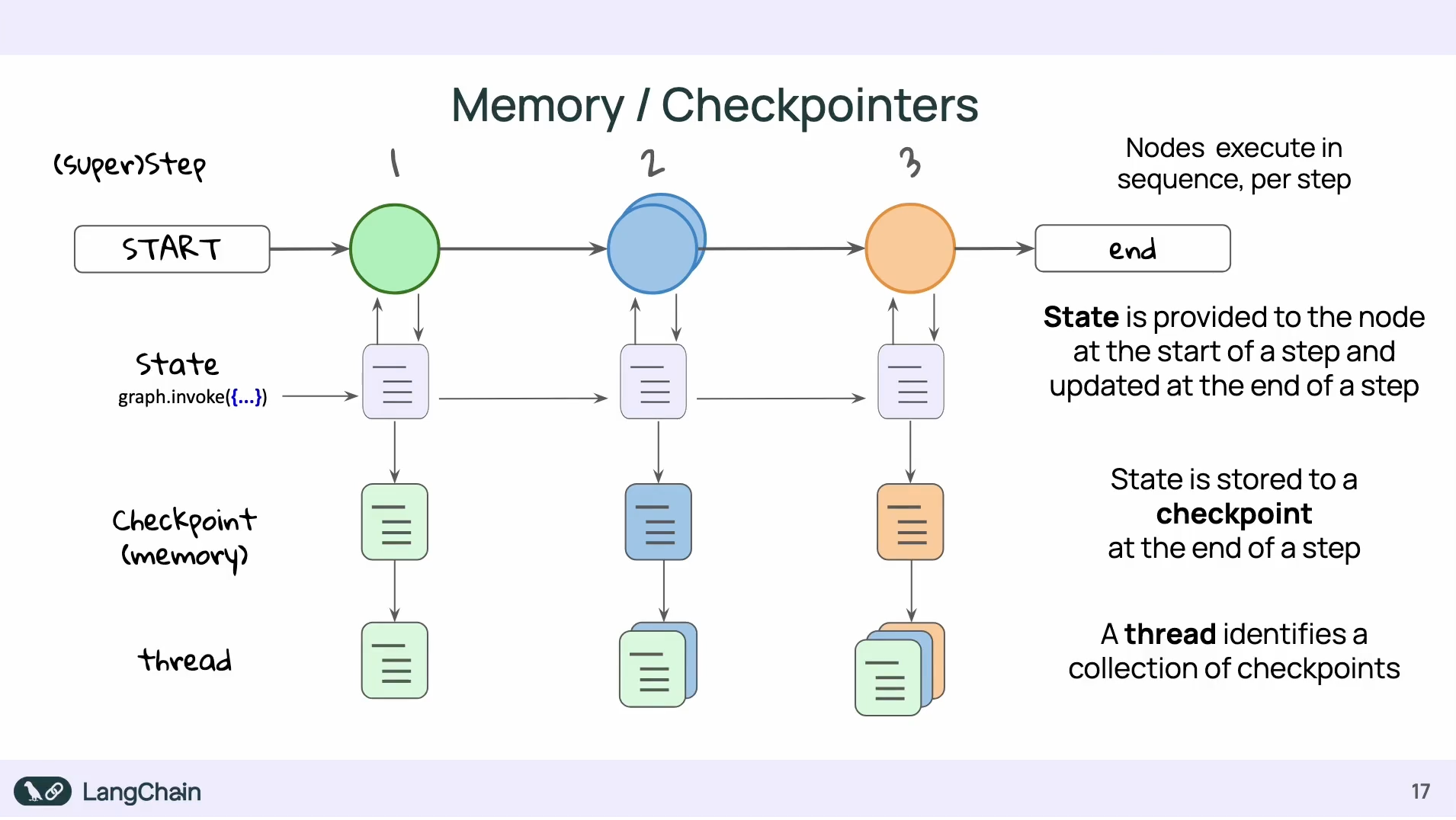
使用 Memory 的好處包含:
- 能夠錯誤的狀態中復原(recover gracefully from failure)
- 能夠 rollback 回特定的時間點(time travel)
- 即時 graph 沒有在運行,也能夠把資料保存下來(persistent state)
- 能夠在任何 step 時還原資料狀態(restore state at any step)
要能夠共享相同資料狀態的前提是他們有相同的 thread_id:
from langgraph.checkpoint.memory import InMemorySaver
# InMemorySaver 可在把 checkpoint 的資訊保存在記憶體中
# 另外還有 PostgresSaver 和 SqliteSaver
memory = InMemorySaver()
config = {"configurable": {"thread_id": "1"}}

graph = builder.compile(checkpointer=memory)

while True:
  user = input('b, c, or q to quit: ')
  input_state = State(nlist = [user])
  result = graph.invoke(input_state, config )
  print( result )
  if result['nlist'][-1] == "q":
      print("quit")
      break
Human in the Loops: Interrupts
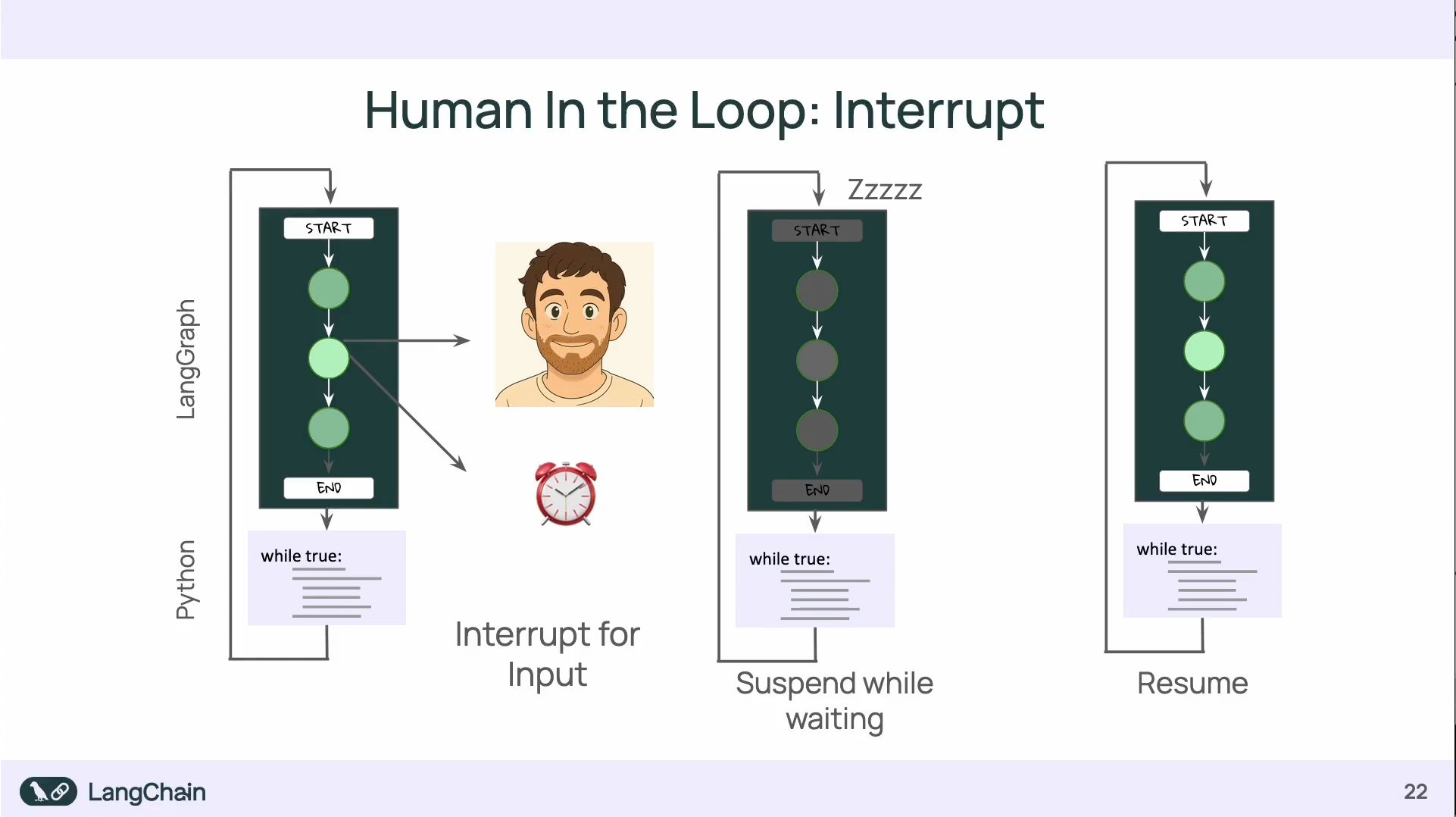
透過 Interrupt 可以暫停 graph 的進行:
- interrupt 的使用會需要 checkpointer 來保存暫停前後的資料狀態
Q & A
同樣是裝 langgraph-cli ,使用 Python 3.12 和 Python 3.14 會有不同的效果:
uv add 'langgraph-cli[inmem]'
使用 Python 3.12 可以直接把 jsonschema-rs 下載下來,但使用 Python 3.14 卻會要把 rust 裝下來重新 build。
原因是在 jsonschema-rs 0.29.1 的套件中,沒有定義 Python :: 3.14 ,所以他會去拉 Rust 要自己在 local build(用 Python 3.13 以前的版本就不會撞到這個問題)
https://github.com/Stranger6667/jsonschema/blob/python-v0.29.1/crates/jsonschema-py/pyproject.toml
但實際上, jsonschema-rs 最新的已經到 v0.37.2,預設就支援 Python 3.14,所以如果是能拉到最新的套件,是不會需要自己 local build 的。